
Today computers have become the essential part of human’s life. They have permeated into every parts of our life from material wealth production to entertainments. The direct results of this are many many documents or files are produced by your desktop or laptop computers. Every day you are making many files or folders in your computer’s hard drive. For each one of them you have spent a lot of working time on it. And every file contains very important data of yours. Meanwhile files management is an important but time consuming task. Are these files safe? Sometimes you lost some very important files. Sometimes you just can’t find them. Sometimes you have too many versions for one document. Surely now you can get more storage at very cheap price. You back up your files into these external media even cloud. But not very long you will find that with many external disks you are falling into another kind of chaos. So many disordered files often make you inefficiency and frustrated. Don’t mention if your computer gets damaged then you lost your very important files. CompareDiff is innovative files management software. It helps you to backup files and maintain documents effectively. Its elaborate design makes your backup and maintaining easy and amusing. CompareDiff makes your files safe and ordered.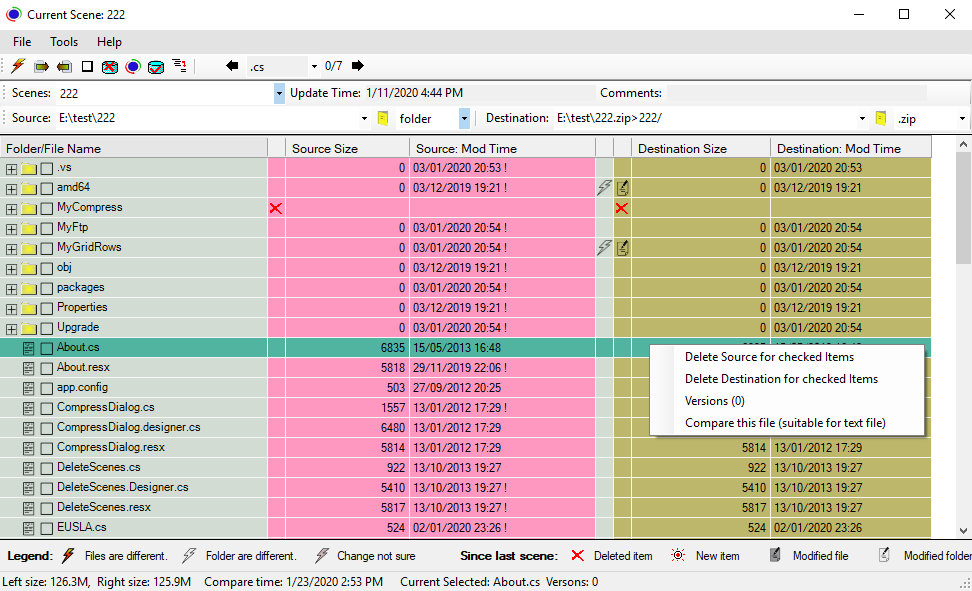
CompareDiff can do:
• Backup documents easily from source location to destination location. Source and destination both can take a format from multi-formats (normal folders, packing format (.exc), ftp server or zip archive).
• Compare two folder’s contents side by side hierarchically with a very intuitive way to discover the differences between two sides.
• Both compared sides can be normal folders, packing format (.exc), ftp server or zip archive.
• According to the perceiving of the difference of two side folders you can manipulate the files to achieve some actions you want to do (merge, delete or synchronize folders or files between two sides).
• One-click to synchronize the two folders according to the principia of synchronizes.
• Save scenes (comparison result at given time) into database so that you can discover the changes since last scene when you compare the two sides. And you can also synchronize folders based on the saved scenes.
• Attached a robust folder packing software (specially developed for CompareDiff) to cooperate with CompareDiff software. From user’s view a folder is not a bunch of files any more but only one concise file. The packing file is ended with exc. It’s just like the popular zip archive file.
• From the version 2.1.0, the formats that can be used to compare included zip achieve. This expanded feature undoubtedly extended zip archive usage.
• CompareDiff can work in two modes: 1. Normal Mode, in this mode no saved comparison results (scene) can be reference. 2. Scene Mode, in this mode the comparison results can reference the scene you saved in database.
• CompareDiff can compare two text files line by line to see their differences. This will be welcomed in many professions, say software developers will use this app to compare their codes.
• When worked in Scene Mode and Show Database Data is selected you can manage versions for particular file. Saving and retrieving a version of file is very easy and intuitive.
• With CompareDiff you can search for a file to find duplicated copies of this file easily.
• When working with a big folder, to save time, you can refresh any subfolder.